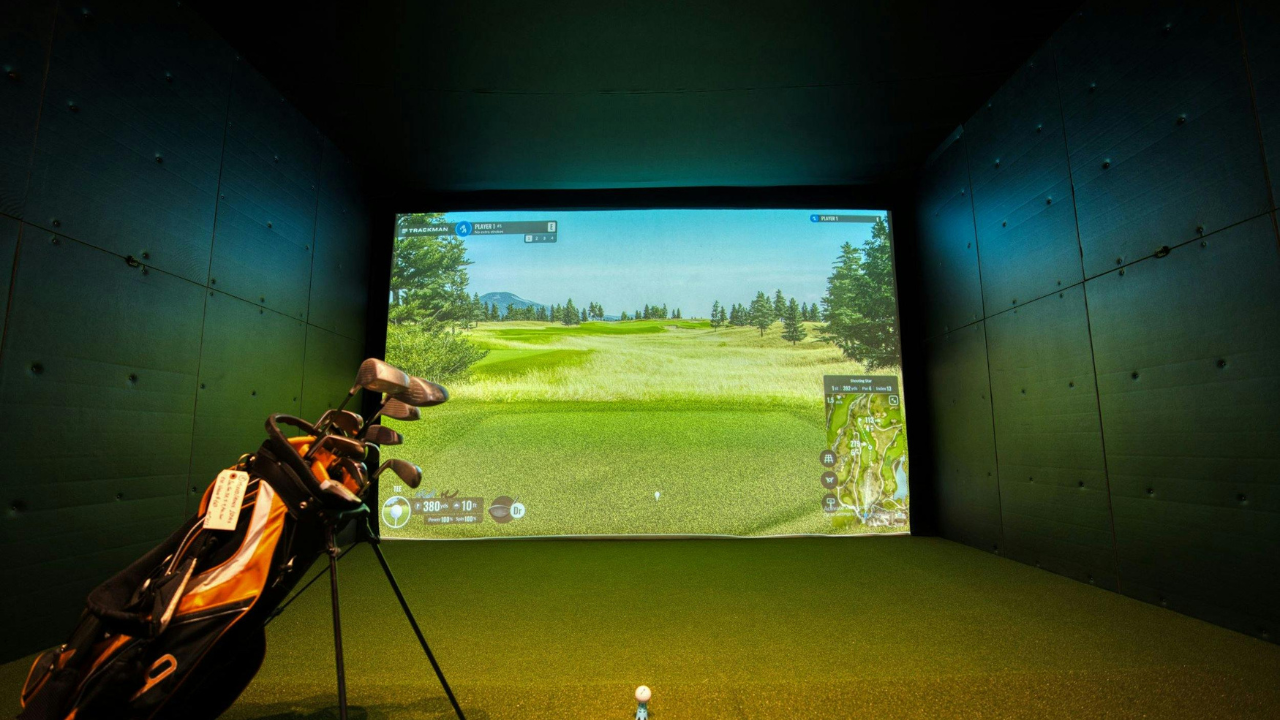
Most indoor golf setups look solid during the day.
Natural light coming in, everything feels bright, clean.
Then night hits.
And suddenly:
-
The screen looks dull
-
Shadows are everywhere
-
Ball tracking starts acting weird
-
Video quality drops hard
Lighting isn’t just about making the room bright.
It’s about where the light is, how it’s controlled, and what it’s hitting.
Get that right, and everything improves at once.
What Good Simulator Lighting Actually Does
A proper lighting setup should:
-
Keep your impact screen clear and visible
-
Let your launch monitor track the ball consistently
-
Avoid harsh shadows around the hitting area
-
Make your space feel comfortable for longer sessions
And if you’re creating content, it also needs to:
-
Make you visible without blowing out the screen
-
Keep things looking clean on camera
That’s where most setups fall apart.
The Biggest Mistake: Lighting the Screen Directly
This is the one almost everyone gets wrong at first.
It feels logical:
“Let me just shine light at the screen so I can see it better.”
But what actually happens:
-
You wash out the image
-
You lose contrast
-
It looks flat and cheap
What to Do Instead
Keep the screen as dark as possible.
Let your projector do the work.
Lighting should focus on:
👉 The hitting area
👉 The golfer
👉 The surrounding space
Not the screen itself.
Start With Overhead Lighting (But Do It Right)
Overhead lighting is your foundation.
But placement matters way more than brightness.
What Works
-
Lights slightly in front of the hitting area
-
Angled down toward where you stand
-
Not directly above or behind you
Why?
Because lighting from behind creates shadows that fall forward—right into your hitting zone.
A clean setup often uses LED panels or bars positioned just ahead of the mat.
Something like:
-
Philips Hue White and Color Ambiance Lightstrip Plus
It can be used around the room to add controlled light without blasting the screen.
Not essential, but useful if you want flexibility.
The Hitting Area: Where Precision Matters
This is the most important lighting zone.
Too dark → tracking issues
Too bright → glare and shadows
You’re aiming for even, soft light.
What That Looks Like
-
No sharp shadows under the ball
-
No bright hotspots
-
Clear visibility of the turf
A lot of people use directional LED spotlights here, but the key is:
Diffused light > harsh beams
Even something as simple as adjusting the angle of your lights makes a huge difference.
Launch Monitor Compatibility (This Is Overlooked)
Different launch monitors react differently to light.
Especially camera-based systems.
If you’re using something like:
-
SkyTrak Launch Monitor
or -
Bushnell Launch Pro
Lighting consistency matters more than raw brightness.
What Helps
-
Avoid flickering lights (cheap LEDs can cause this)
-
Keep lighting stable across sessions
-
Don’t create shadows across the ball path
This is one of those things where:
“If it works once but not always… it’s probably your lighting.”
Ambient Lighting: Making the Room Feel Right
Once the hitting zone is dialed in, you can think about the rest of the room.
This is more about comfort and vibe.
Options That Work Well
-
LED strips along walls or behind enclosures
-
Soft corner lighting
-
Backlighting behind your setup
A setup like:
- Govee Smart LED Strip Lights
lets you control brightness without affecting your main hitting area.
This isn’t necessary, but it makes the space feel way more finished.
Enclosures Help More Than You Think
Lighting behaves differently in open vs enclosed setups.
An enclosure like:
- SimSpace Golf Simulator Enclosure
helps by:
-
Blocking external light
-
Reducing glare
-
Creating a controlled environment
Open setups often deal with inconsistent lighting, especially during the day.
Daylight vs Night Setup (Plan for Both)
This is something people don’t think about until it becomes annoying.
During the Day
-
Natural light can wash out your screen
-
Shadows shift constantly
At Night
-
Everything depends on your artificial lighting
-
Weak setups become obvious
What Helps
-
Blackout curtains if you have windows
-
A setup that works independently of daylight
You want consistency.
Not something that only works at certain times.
Budget vs Results: Where Lighting Actually Matters
If you’re trying to keep things simple:
Priority Order
-
Hitting area lighting
-
Overhead placement
-
Light control (blocking unwanted light)
-
Ambient upgrades
You don’t need expensive lighting.
You need intentional lighting.
Common Mistakes to Avoid
Lighting the screen directly
Kills your image quality instantly.
Using one bright light source
Creates harsh shadows and uneven lighting.
Ignoring shadows around the ball
This affects both feel and tracking.
Mixing random light types
Different color temperatures make the room feel off and inconsistent.
Relying on natural light
Looks good sometimes. Unreliable overall.
Setup Tips That Actually Help
Keep your light color consistent
Stick to one temperature (usually neutral white).
Test with real swings
Stand in your setup and hit balls.
You’ll notice shadows way faster than just looking at it.
Adjust angles before buying more lights
Placement fixes more problems than adding brightness.
Think like a camera
If you’re filming content, lighting should make you visible without blowing out the screen.
Realistic Expectations
Good lighting won’t:
-
Make a bad projector look amazing
-
Fix a poor screen setup
-
Completely eliminate shadows
But it will:
-
Make your simulator easier to use
-
Improve tracking consistency
-
Make the space feel more professional
And honestly, it’s one of the fastest upgrades you can feel.
What I’d Do If I Was Setting This Up From Scratch
Simple and effective:
-
Overhead lighting slightly in front of the hitting area
-
Even, diffused light on the mat
-
Keep the screen dark
-
Add ambient lighting later if you want
That’s it.
You don’t need a complicated setup.
You just need to avoid the common mistakes.
Final Thoughts
Lighting is one of those things that doesn’t seem important—until it is.
Once it’s dialed in, everything feels better:
-
The visuals
-
The tracking
-
The overall experience
And you stop thinking about it.
Which is exactly what you want.